Accurate punch sensing
High-sensitivity detection records punch count and impact force for every round.
Turn any punching bag into a connected trainer.
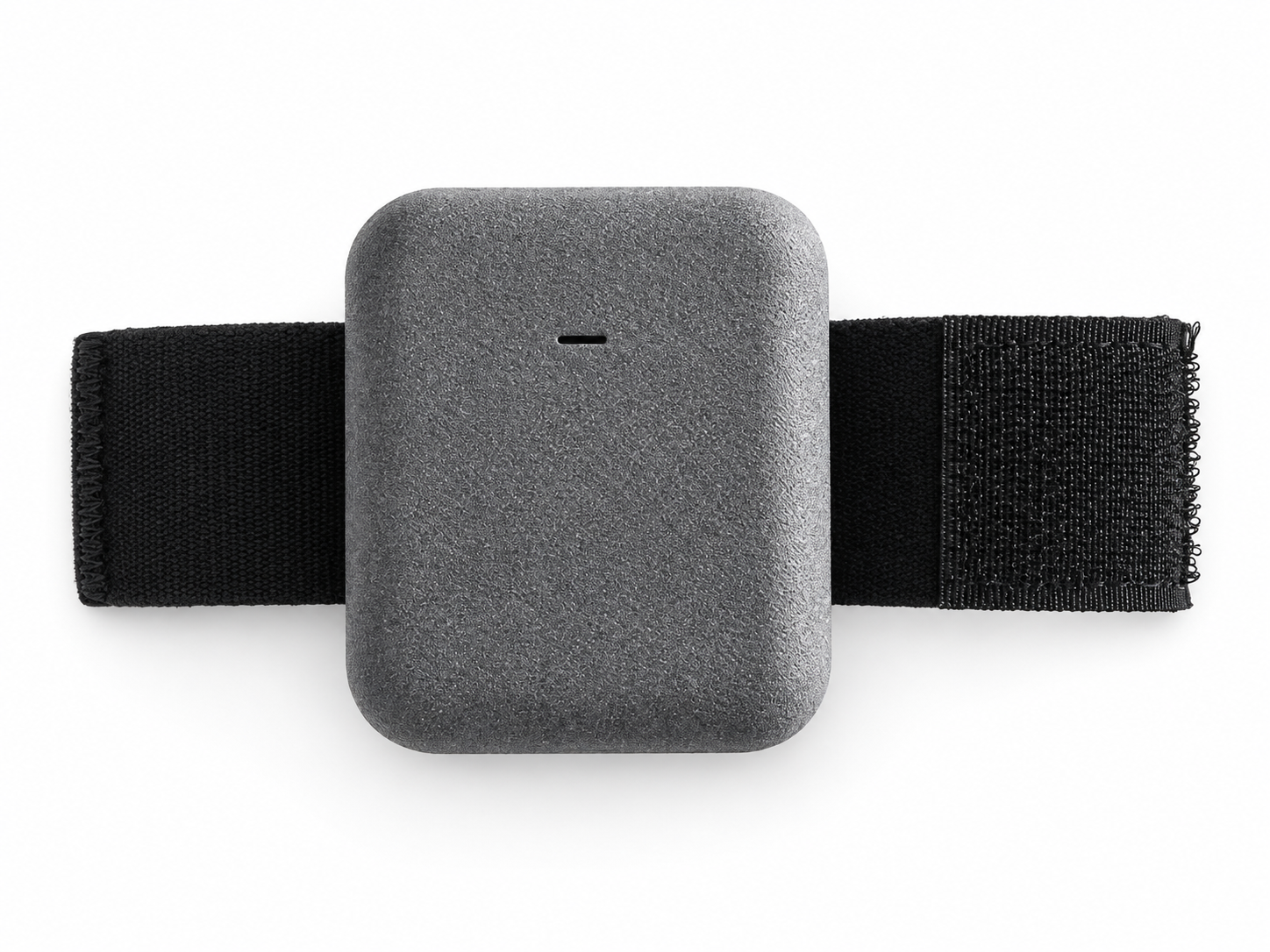
An ultra-compact BLE sensor kit that tracks punch count, impact force and training rhythm through the HitRise mobile app.
 BLE CONNECTED TRAINING SYSTEM
Source: WaveMill official product materials. Last reviewed: November 18, 2026. Commercial terms and compliance documents must be confirmed against the final quotation and delivered configuration.
WM-BB combines a compact retrofit format with connected training data for equipment brands and fitness operators.
High-sensitivity detection records punch count and impact force for every round.
Mount with adhesive hook-and-loop fasteners or an elastic strap without drilling the bag.
Follow punch count, BPM, force, combos, calories and estimated fat burned in the app.
Free and Beat-Sync modes add timing scores, sound effects and background music.
Round reports, achievements and leaderboards keep individuals and groups engaged.
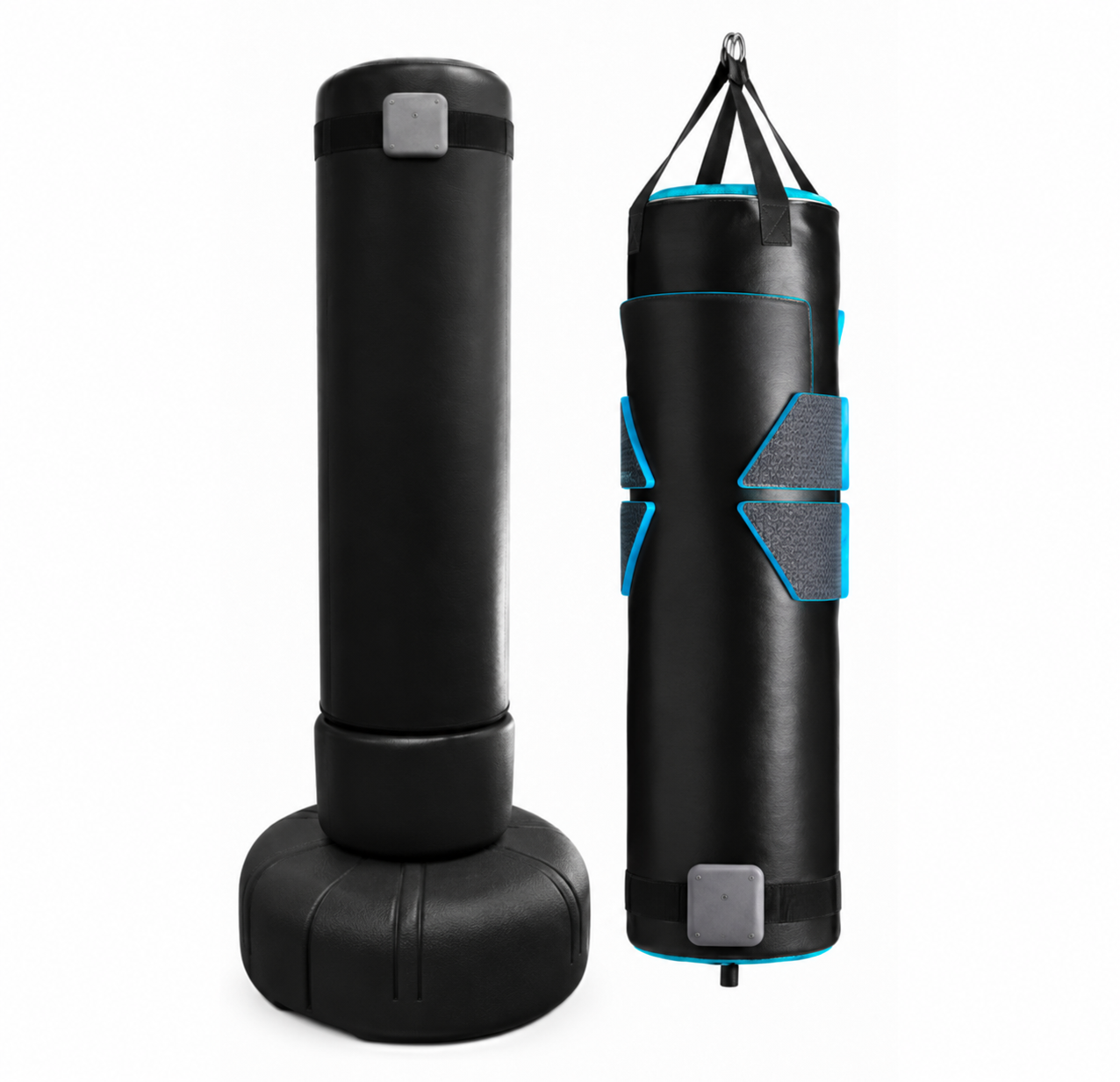
One compact model supports standing, hanging and children's inflatable tumbler bags.
Mount on the flat top of a free-standing bag, the bottom end cap of a hanging bag, or the top dome of a children's inflatable tumbler bag. Keep the sensor away from the striking surface.
See the sensor, app connection and live workout data.
See smart boxing used for live group challenges and rankings.
WaveMill can cooperate on testing, labels, packaging, user manuals and technical documentation according to the target country and final configuration. Target standards are not presented as completed certifications.
No. WM-BB is an externally mounted sensor that can add punch tracking to a compatible existing bag. Installation does not require drilling; the available mounting methods are adhesive hook-and-loop fasteners and an elastic strap.
WM-BB supports free-standing bags, hanging bags and children's inflatable tumbler bags. Stable mounting and reliable counting depend on the bag shape, surface material, filling and movement. Before ordering, prepare a full-bag photo, a close-up of the proposed mounting area and its dimensions.
WM-BB is a smart retrofit kit and normally does not include the punching bag. Before purchase, use the packing list for the selected SKU or quotation to confirm the number of sensors, mounting accessories and whether a bag is included.
For adhesive hook-and-loop mounting, first check the flat top area of a free-standing bag, the bottom end cap of a hanging bag, or the top curved area of an inflatable tumbler bag. For an elastic strap, make sure the mount cannot slip. The sensor must stay outside the reachable area of straight punches, hooks and kicks. If it can be hit, choose a safer position and test again.
Use adhesive hook-and-loop fasteners on a flat surface confirmed to be suitable for bonding. Choose the elastic strap when frequent removal is preferred and the bag has a stable wraparound area. For textured, coated, curved or inflatable surfaces, test in an inconspicuous place and check for residue, pressure marks and slipping.
After connecting the app, throw ten separated light-to-medium punches and compare the actual count with the increase shown on screen. Let the bag swing naturally without hitting it and check for false counts; if needed, adjust sensitivity in the app. Then test a short combination. If results differ, check the mounting position and tightness before retesting.
WM-BB uses a USB Type-C port and 5 V input. Follow the supplied instructions to charge and wake the device, enable Bluetooth and the required app permissions, then scan for the sensor inside the companion app. The confirmed app name on Android and iOS is wavemill HitRise.
Check the battery level, whether the sensor is awake, Bluetooth permissions and whether another device is already connected. Move the phone closer and scan again inside the app. Gyms should test from the actual operating and display positions. After reconnecting, check the round record; missing data should not be treated as automatically recovered.
Product information states up to about 60 days of standby time or about 8 hours of continuous training on a full charge; these figures represent different operating states. Actual time depends on usage frequency and battery condition. For a full charge, allow at least four hours. Use WM-BB in a dry environment and follow the supplied cleaning and charging instructions.
During training, HitRise can show time, punch count, punch frequency, relative force and combinations. Round reports include count, duration, maximum and average relative force, plus calorie and equivalent fat-burn estimates. Product materials also list free training, rhythm training, achievements and rankings; actual functions depend on the delivered version. Force is a relative score without a physical unit, while calorie and fat-burn values are estimates and are not for weight-loss or medical diagnosis.
A punching bag rebounds and swings, while a loose sensor can create additional vibration. Very light punches and combinations with little separation are also harder to distinguish. Test known single punches first, then light punches, combinations and bag movement without impact. If the issue continues, record the bag model, mounting position and app version. The latest HitRise version provides sensitivity settings that can be adjusted for more accurate counting.
No. WM-BB shows force plus maximum and average force as relative scores. The available materials do not provide a verifiable physical unit, calibration method or measurement error. Use the score to compare sessions on the same bag and at the same mounting position. For absolute impact force, use a calibrated reference instrument designed for dynamic impact.
Punch frequency on the training screen describes the punching rate per minute. BPM in rhythm mode is the cue tempo, with a listed setting range of 40-140 BPM. Perfect, Good and Miss describe timing against that cue. A 120 BPM cue does not mean that 120 valid punches were completed in one minute.
The WM-BB bag sensor does not currently identify the punching hand or classify Straight, Uppercut and Hook. Its confirmed functions are bag-side impact recognition and training data. Punch-type recognition normally requires direct observation of hand movement, such as validated dual-wrist IMUs or a video solution. WM-BF Smart Boxing Gloves with BoxingFitness can support Straight, Uppercut and Hook recognition.
No. They are estimates intended for comparing activity trends across similar workouts. Equivalent fat burned does not mean the body has lost that amount of fat, and it is not intended for medical, nutrition or weight-management decisions.
When offline, records are stored locally and uploaded after the network connection returns. Data export is not currently supported.
HitRise is designed for individual training, round review and personal ranking challenges. HitArena supports simultaneous scoring across multiple stations, participant assignment and large-screen display. Before purchasing a competition solution, confirm that the selected sensors, tablet, app version and display method work together as one tested system.
A practical pilot configuration is one tablet with four training stations. Actual capacity depends on the tablet, app version and site conditions, and a pilot does not establish a higher system limit. Test the full planned device count and verify scoring while casting to the display. HitArena currently supports four device sets.
Yes, if they are organized into appropriate groups. For force-based rankings, use the same bag model with similar filling and mounting condition, then verify each station with the same test procedure. If equipment differences are substantial, rank by equipment group or use a valid-punch-count challenge with one consistent rule.
Punch-count challenges work well for beginners and short events, with a minimum valid-impact threshold if available. Force competitions should limit the number of counted punches and state whether the peak or an average of several strong punches wins. Combined scoring must publish its metrics, weights and tie-break rules in advance. Available options depend on the delivered software version.
No. Points cannot currently be counted while the device is disconnected during a competition.
The sensor measures 46 x 39 x 25 mm and has a net weight of about 22 g. Product information lists a 100 x 55 x 40 mm inner box and a 52 x 24 x 20 cm outer carton for 100 pieces, with a stated gross carton weight of 15 kg. The standard MOQ is 500 sets. Final packing and weight are subject to the confirmed packing list.
Send photos and dimensions of the punching bag, target market, estimated quantity, accessory needs and app requirements to discuss sampling. The quotation should state the delivered configuration, customization costs, sample and production lead times, and whether mounting accessories, software services and custom packaging are priced separately.
Yes. Buyers may submit OEM or ODM requirements. Product branding, packaging, manuals, interface languages, branded apps and hardware or software changes are confirmed separately. A custom app also requires agreement on the app-store publisher, update responsibility, data management and long-term service fees.
First confirm the sales market, customer type and final product configuration, then request test reports, label artwork and applicable compliance documents for that model. WaveMill can support project-specific review of matters such as US FCC Part 15, button-cell requirements, and European RED and RoHS. Listing these items does not mean that every configuration has completed testing or obtained the relevant documents.
Provide the model or batch, installation photos, phone model and operating system, app version, steps that reproduce the issue and a short video. For counting issues, include the actual punch count and the app result; sensitivity can be adjusted. For connection issues, specify whether the device cannot be found, cannot connect or disconnects after connecting. Warranty coverage, spare-parts supply and response time follow the order agreement.
Product information lists children's inflatable tumbler bags as a compatible type. An adult should install and inspect the sensor, keep the device and accessories away from the striking area, prevent loosening, and follow the bag's age and use instructions. A combination product marketed for children requires a separate review of labels and safety requirements in its final configuration.
The current HitRise materials identify WM-BB Smart Boxing Bag Sensor, WM-BS Smart Boxing Reflex Bag and WM-DS Digital Boxing Reflex Bag as compatible product series. Compatibility with another device, firmware or customized sensor must be confirmed against the delivered app and hardware configuration.
The confirmed app name for both Android and iOS is wavemill HitRise. Public download links are not currently displayed on this website. The app is supplied for use with compatible smart boxing hardware according to the delivered project configuration.
For first use, connect the new device to a compliant 5 V Type-C supply for at least five seconds to activate it, secure the device and enable the required phone permissions. If the device has been still for about one minute, strike it once to wake Bluetooth. After activation and wake-up, scan in wavemill HitRise for a device name beginning with SENBALL# and connect directly.
Check first-use Type-C activation, phone Bluetooth and app permissions. A compatible device enters low-power mode after about one minute without movement, so strike it once before scanning. Keep the phone nearby, cancel any operating-system pairing request and scan again inside wavemill HitRise.
Depending on the compatible device and training session, HitRise can show round time, valid punch count, BPM, Relative Power Score, estimated calories and estimated equivalent fat burn. Reports can also summarize cumulative duration, punch count, peak and average Relative Power Score, average BPM and best combo.
No. Relative Power Score is a raw hardware value without a physical unit. It is not kilograms, kilogram-force or newtons and should not be converted directly into absolute force. Use it only to compare relative changes under similar device, mounting and training conditions.
Free mode uses BPM as a reference metronome without rhythm scoring. Rhythm mode uses the selected BPM to drive the training beat and rhythm score. Work time, rest time, rounds and BPM can be configured before the session.
Work time can be set from 1 to 10 minutes, rest from 0 to 5 minutes in 0.5-minute steps and rounds from 1 to 10. BPM is adjustable from 100 to 300 in steps of five, with reference levels at 100, 150, 200, 250 and 300 BPM.
The current workflow retains completed results locally when the network is unavailable and can attempt cloud synchronization later. Leaderboard refresh and cloud data require a network connection. Confirm account, storage and synchronization behavior in the app version delivered with the hardware.
HitRise supports Simplified Chinese, English, French, Spanish, German, Korean and Thai. Estimated calories and equivalent fat burn are motivational exercise feedback only. They must not be used for medical diagnosis or as the basis for a weight-loss plan, application or outcome assessment.
The wavemill Smart Sensor Ball Training App is the companion mobile application supplied with the WM-HM Head-Mounted Boxing Reflex Ball. It connects to the sensor ball over Bluetooth Low Energy and organizes valid-hit counting, timed training, reports, achievements, leaderboards, profile data and light control into a personal training workflow.
The confirmed compatible product is the WM-HM Head-Mounted Boxing Reflex Ball, including its head harness, adjustable elastic cord and sensor-equipped light ball. Compatibility with another sensor, firmware or customized product must be confirmed against the delivered app and hardware configuration.
Yes. The confirmed project configuration supports Android and iOS. The app is supplied with compatible WM-HM hardware; this website does not currently display public download links. Confirm the operating-system version and delivered app build for each order or customized project.
Charge the WM-HM sensor ball with Type-C 5 V power, enable phone Bluetooth and the required app permissions, then tap the ball once if it has been still for about one minute. In app Settings, scan for a device name beginning with SENBALL# and ending with a digit, select it and connect. Confirm the Bluetooth icon and battery display before training.
The device enters low-power mode after about one minute of inactivity. Tap the ball once, keep it close to the phone, confirm sufficient battery, Bluetooth and app permissions, and scan again inside the app. The scan lists compatible names that begin with SENBALL# and end with a digit. Restart phone Bluetooth or the app if the state does not refresh.
The current materials list six modes: Classic 30s, Endurance 60s, Burst 10s, Burst 15s, Level Challenge and Daily Challenge. Timing and sensor counting begin after the 3, 2, 1, GO sequence finishes. Exact prompts, scoring and challenge rules depend on the app version supplied with the hardware.
The app records the selected mode, training duration and valid punch count. Reports can include session time, total valid hits, average hit frequency and best burst. The app also uses saved records for training history, achievements, best 30-second and 60-second scores, total-hit rankings and training streaks.
No. Punch force is not displayed in the current app. In night-light mode only, force data from the device adjusts flash intensity so a stronger valid hit can produce a brighter flash. This light response is not a calibrated force measurement and should not be described in newtons, kilograms or kilogram-force.
After Bluetooth connects, enable night-light mode in Settings and set base brightness from 0 to 100. The default is 20 until changed. Each valid hit triggers one flash, and stronger hits can produce brighter flashes. The light is off by default and turns off after Bluetooth disconnects or the app restarts.
Yes. Bluetooth counting, the timer and local training can continue when the network or cloud service is temporarily unavailable. Upload is delayed and the app can retry synchronization when connectivity returns. Cloud leaderboards and refreshed online records require a network connection.
The current version supports Simplified Chinese, English, French, Spanish, German, Korean and Thai interfaces. Simplified Chinese uses Chinese countdown voice prompts, while the other listed interface languages currently use English voice prompts. Confirm localized legal documents and the delivered app version for the target market.
Yes. The current materials list session reports, system sharing, achievement badges and tiers, profile history and leaderboards for best 30-second score, best 60-second score, total hits and longest training streak. Leaderboard data depends on records saved by the app and successfully synchronized to the cloud.
The wavemill HitArena App is an Android group-training and group-competition application supplied with a confirmed WM-BS, WM-BB or WM-DS project configuration. It connects one to four smart boxing devices over Bluetooth Low Energy, runs synchronized rounds and records valid hits, Relative Power Score, results and rankings.
HitArena is designed for gym challenges, boxing-club activities, event competitions, entertainment venues and other projects that need synchronized scoring across one to four stations. The venue should provide safe spacing, stable device installation and an Android tablet or phone that has been verified with the delivered configuration.
The confirmed configuration provides target positions 1-4, with one bound smart boxing device per position. A match can therefore use one to four stations. Before Start, every assigned station must be connected and its write channel must be ready.
The current manual lists WM-BS Smart Boxing Reflex Bag, WM-BB Smart Boxing Bag Sensor and WM-DS Digital Boxing Reflex Bag. The app is supplied with compatible hardware and the confirmed project configuration. Compatibility depends on the delivered sensor, firmware, app build and Android device and should be verified before an event or bulk rollout.
First activate each device with Type-C 5 V power for at least five seconds. In Settings > Bluetooth Connection, select a target position, scan for a device name beginning with SENBALL#, select the corresponding device and connect it. Repeat for every position or use Connect All Devices after bindings are saved. Confirm the station color, battery and write-channel state before starting.
Confirm first-use Type-C activation, battery level, Android Bluetooth and Nearby devices permission. A sensor that has been still for about one minute may enter low-power mode, so tap it once and scan again inside HitArena. Keep the tablet close, cancel any Android system pairing request and clear a residual connection by turning system Bluetooth off and on if necessary.
The current manual lists Sprint Match at 30 seconds, Standard Match at 60 seconds, Endurance Match at 120 seconds, Professional Challenge with three 60-second rounds and 10-second breaks, and Custom Match. Custom Match defaults to 60 seconds, 30 seconds of rest and three rounds; exact delivered settings depend on the app build.
HitArena provides Hit Count, Power and Combined matches. Hit Count uses valid hits that meet the active threshold. Power uses the average of a configurable number of strongest hits after the required hit count is completed. Combined calculates a normalized Speed Score and Power Score; the current default weights are 60% speed and 40% power and must total 100%.
No. Relative Power Score is the raw value reported by compatible hardware. It has no physical unit and must not be represented as kilograms, kilogram-force or newtons. Compare it only under the same or similar device model, installation, sensitivity and match conditions.
Yes. Match results and local rankings are stored locally by default and can still be generated when the network is unavailable. Cloud upload and refreshed trusted rankings require a network connection. If connectivity returns, upload may be retried according to the user's Data Upload choice.
A match can enter Trusted Rankings only when the user has enabled Data Upload, every sensor in that match is shown as a HitArena Certified Device and the complete match data passes server validation. Certification is conditional and should not be assumed for every product batch. Matches that do not meet these conditions can still produce local results and rankings.
The current manual lists Simplified Chinese, English, French, Spanish, German, Korean and Thai. The Chinese interface uses Chinese countdown speech; the other listed interfaces currently use English countdown speech. Confirm the delivered app build and localized agreements for the destination market.
HitArena attempts to reconnect only the disconnected target so the other stations are not interrupted. If reconnection repeatedly fails, disconnect and unbind that target, wake the sensor, turn Android Bluetooth off and on, then bind it again. Verify station assignment, battery and write-channel status before restarting a match.
The 3, 2, 1, GO countdown starts only after every assigned target position is connected and every write channel is ready. Check the station identified by the app, wake or reconnect its device and confirm the battery and binding. During a break, the app intentionally pauses hit and Relative Power Score updates until the next active round.
Secure every device, keep target positions safely spaced and remove sharp, fragile or obstructing objects. Use comparable equipment and installation conditions, check cables and charging ports, warm up before play and stop if a device loosens or a participant feels unwell. App data is exercise and competition feedback, not medical or rehabilitation advice.
wavemill BoxingFitness App is a smart boxing training application supplied with compatible WM-BF Smart Boxing Gloves. It connects a matched left-and-right glove pair over Bluetooth Low Energy and organizes sensor data into boxing training, stress-relief and fitness fat-burning sessions, results, achievements, rankings and personal history.
The confirmed project scope supports Android and iOS. BoxingFitness is supplied with compatible WM-BF hardware and the confirmed project configuration. This website does not display a public app-download button or a public user-manual download.
The confirmed hardware is a matched WM-BF Smart Boxing Gloves pair. One left and one right glove must share the same final six-character identifier. Compatibility depends on the delivered glove electronics, firmware, app build and phone and should be verified before sampling or volume rollout.
Activate each glove with a compliant 5 V Type-C supply for at least five seconds, wake a sleeping glove with one strike and allow the phone's Bluetooth permissions. In BoxingFitness Settings, scan for BOXING#L and BOXING#R devices with the same final six characters. Selecting either member connects the matched pair.
Charge and activate both gloves, strike the missing glove once to leave low-power sleep and confirm that the left and right names share the same final six characters. Keep the phone close, cancel any operating-system pairing request and connect inside BoxingFitness. If reconnection still fails, disconnect the saved pair, restart phone Bluetooth and scan again.
Boxing Training includes Single Punch Training, Free Technique and Combination Training. Stress Relief includes Color Graffiti and Emotion Champ. Fitness Fat Burning includes Rapid Fat Burn and Fat Burn Challenge. Exact prompts, graphics, sound effects and scoring depend on the delivered app build.
The confirmed punch names are Straight, Uppercut and Hook, corresponding to 直拳, 勾拳 and 摆拳. Supported training modes evaluate the active hand, punch type or combination order according to the delivered recognition model. Performance should be checked with the final glove fit, sensor position, sensitivity and app version.
Punch Force is the calibrated maximum from the flexible Pressure Point 1 sensor during the punch window and is displayed in kilograms. Relative Force is a separate score derived from IMU motion data. Both are training feedback and are not certified professional-competition measurements.
Sensitivity is adjustable from 0 to 100, with a current default of 75. A higher value lowers the device threshold and makes lighter strikes easier to detect. Increase it when valid light punches are missed; decrease it when movement or one punch produces duplicate counts. Save writes the selected setting to both connected gloves.
Use a compliant 5 V Type-C power source and keep the port dry. Before first use, connect each glove for at least five seconds to activate it. Charging and operating time vary by WM-BF hardware version, battery condition, radio environment and use pattern, so one universal standby or continuous-training duration is not claimed.
Supported completed workout records remain available locally when the network is unavailable and synchronization can resume later. Cloud history, leaderboard refresh, personal rank and sharing require a network connection. Actual account, storage and synchronization behavior follows the app version delivered with the WM-BF project.
The current interface set includes Simplified Chinese, English, French, Spanish, German, Korean and Thai. Simplified Chinese uses Chinese countdown speech; the other listed interfaces use English countdown speech. Confirm localized agreements, warnings and store materials for the destination market.
No. Punch detection uses sensors in the WM-BF gloves and Bluetooth data. The confirmed workflow does not use microphone-based sound recognition and does not collect voice samples or background audio for punch counting. Privacy and agreement information should still be reviewed in the delivered app.
No. Estimated calories and equivalent fat burn are exercise feedback only and must not be used for medical diagnosis or weight-loss outcomes. Punch Force and Relative Force are training feedback and are not certified professional-competition measurements. Stop training if pain, dizziness, chest tightness or other discomfort occurs.
Compare traditional punching bags, sensor-upgraded bags and interactive smart boxing machines by coaching input, feedback, installation, maintenance and data retention.
READ ↗02Understand how paired gloves detect contact, identify the active hand and classify Straight, Uppercut and Hook, then validate results punch by punch.
READ ↗03How 800 Hz pressure and motion sampling, a calibrated threshold and peak tracking separate a real bag contact from an air swing and count one contact only once.
READ ↗Connected reflex training for homes, gyms and boxing clubs.
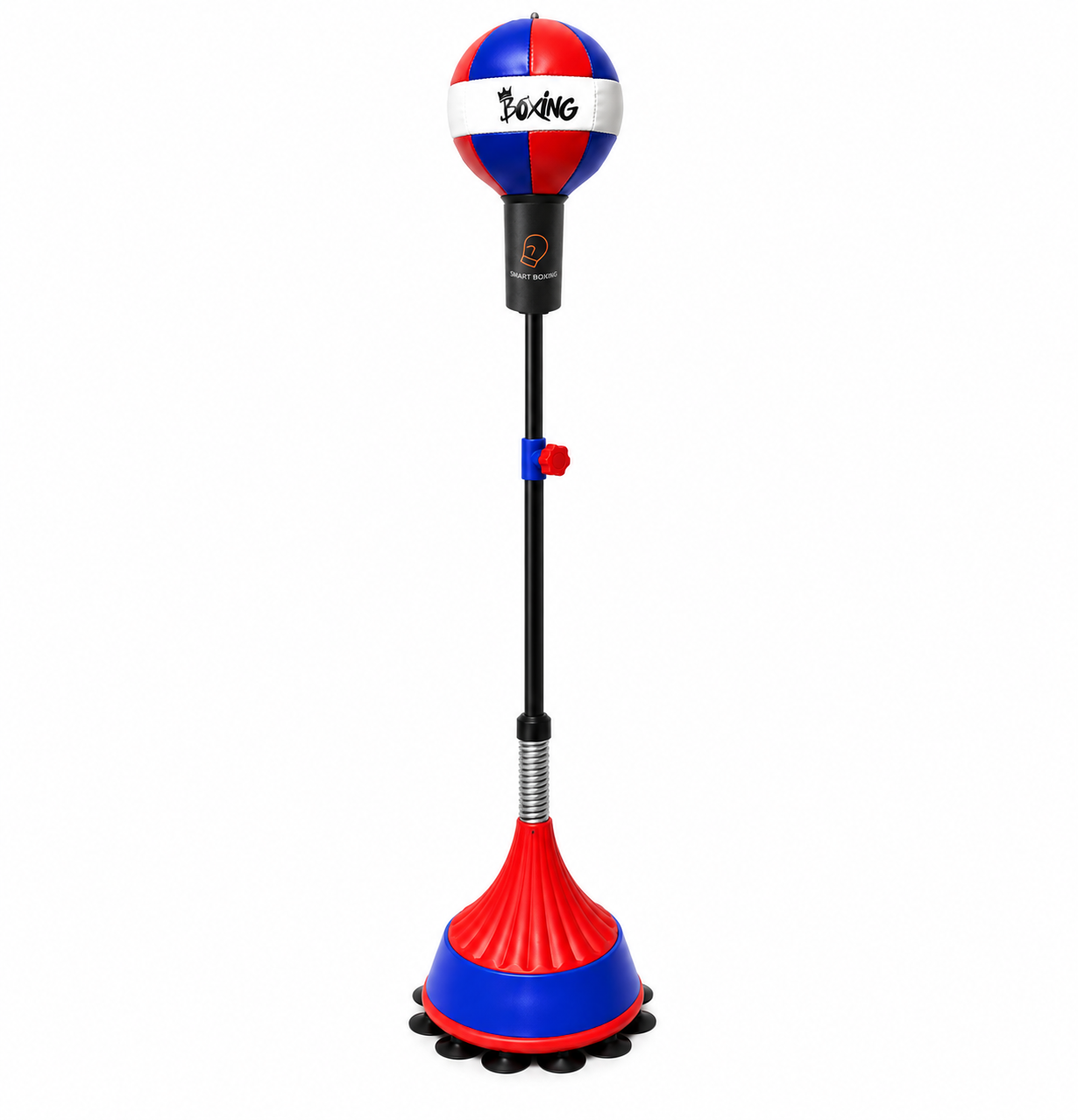 WM-BSSmart Boxing Reflex Bag WM-BS↗
MOQ is 500 sets. Tell us your quantity, target market, packaging and OEM/ODM requirements.
The demonstration covers sensor installation, mobile connection and the training data shown during an individual bag workout.
Read bilingual transcript →