SIX PERSONAL TRAINING MODES
Covers 30-second, 60-second, short-burst, level and daily challenges.
Valid-hit counting, timed reaction training, reports and light control for WM-HM.
An Android and iOS companion application supplied with the WM-HM Head-Mounted Boxing Reflex Ball, using Bluetooth Low Energy for six training modes, live valid-hit counting, reports, achievements, leaderboards, cloud sync and impact-responsive light control.
 INCLUDED WITH WM-HM HARDWARE
Source: Smart Sensor Ball user manual and confirmed project information. Last reviewed: November 19, 2026. Software functions, platform compatibility and cloud services depend on the version supplied with WM-HM and the delivered project configuration.
Smart Sensor Ball organizes WM-HM sensor data into sessions, reports, achievements, leaderboards and personal history.
Covers 30-second, 60-second, short-burst, level and daily challenges.
The sensor updates valid hits, battery and charging status over BLE.
Review session time, total hits, average hit frequency and best burst.
Track badges, tiers, 30- and 60-second scores and training streaks.
Set base brightness and trigger one flash for every valid hit.
Supports seven interface languages and is supplied with compatible WM-HM hardware.
After Start, the app presents 3, 2, 1, GO. Timing and sensor counting begin only after GO finishes.
30-second classic valid-hit session
60-second endurance session
10-second short-burst effort
15-second short-burst effort
Progressive level challenge
Daily training challenge
The app is supplied with WM-HM hardware and the confirmed project configuration, not as a public standalone download. Compatibility with other hardware requires separate confirmation.
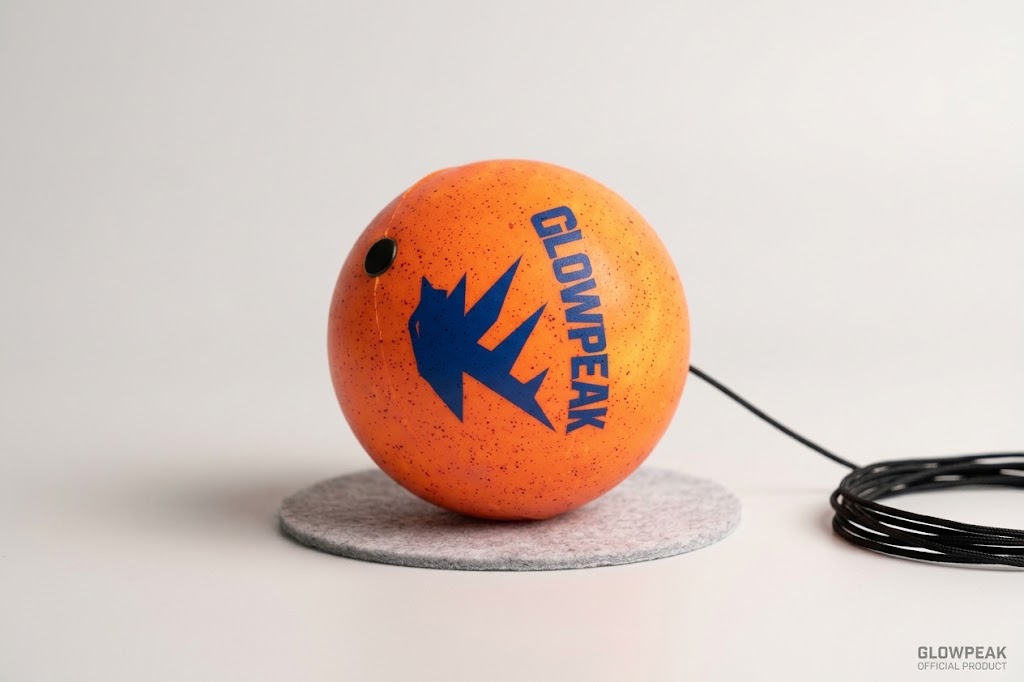
Light-feedback reaction training with BLE workout data.
View the WM-HM product page →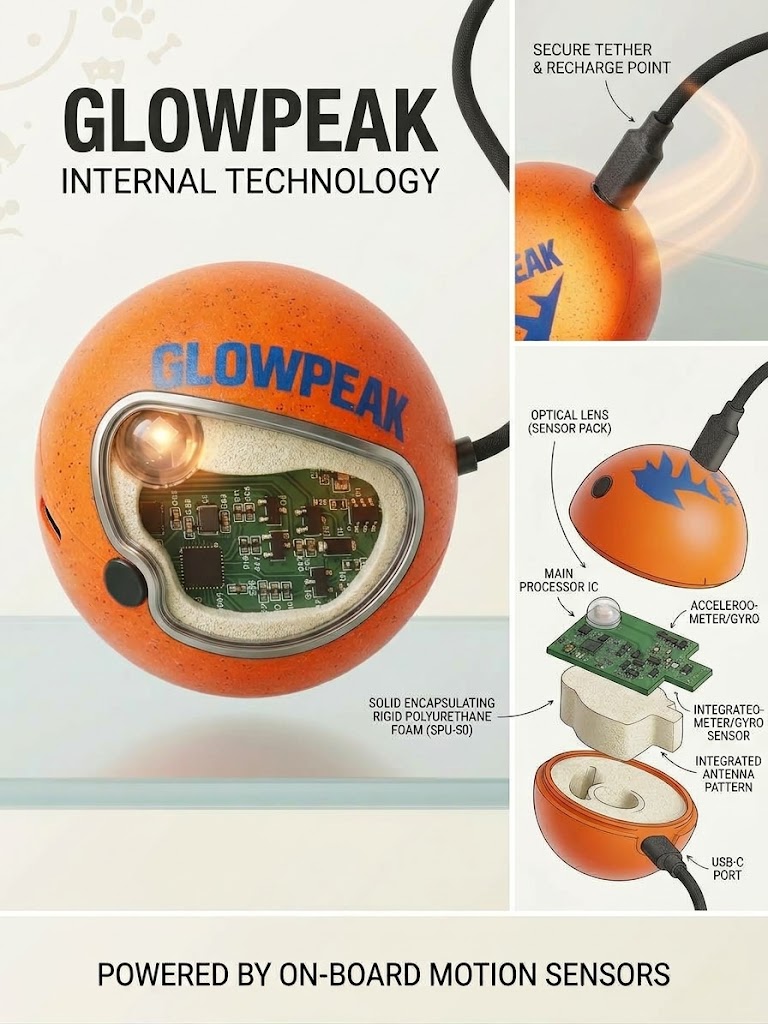
Valid hits drive app counting. Force is not displayed and only adjusts flash intensity in night-light mode.
Scan for a device name beginning with SENBALL# and ending with a digit; confirm Bluetooth and battery status before training.
Charge the sensor ball with a Type-C 5 V supply.
Tap the ball once after about one minute of inactivity.
Allow Bluetooth permissions, scan SENBALL# and connect.
Confirm battery, select a session and start after GO.
Publishing functions and limits together helps buyers, users, Google and AI search interpret the product correctly.
The wavemill Smart Sensor Ball Training App is the companion mobile application supplied with the WM-HM Head-Mounted Boxing Reflex Ball. It connects to the sensor ball over Bluetooth Low Energy and organizes valid-hit counting, timed training, reports, achievements, leaderboards, profile data and light control into a personal training workflow.
The confirmed compatible product is the WM-HM Head-Mounted Boxing Reflex Ball, including its head harness, adjustable elastic cord and sensor-equipped light ball. Compatibility with another sensor, firmware or customized product must be confirmed against the delivered app and hardware configuration.
Yes. The confirmed project configuration supports Android and iOS. The app is supplied with compatible WM-HM hardware; this website does not currently display public download links. Confirm the operating-system version and delivered app build for each order or customized project.
Charge the WM-HM sensor ball with Type-C 5 V power, enable phone Bluetooth and the required app permissions, then tap the ball once if it has been still for about one minute. In app Settings, scan for a device name beginning with SENBALL# and ending with a digit, select it and connect. Confirm the Bluetooth icon and battery display before training.
The device enters low-power mode after about one minute of inactivity. Tap the ball once, keep it close to the phone, confirm sufficient battery, Bluetooth and app permissions, and scan again inside the app. The scan lists compatible names that begin with SENBALL# and end with a digit. Restart phone Bluetooth or the app if the state does not refresh.
The current materials list six modes: Classic 30s, Endurance 60s, Burst 10s, Burst 15s, Level Challenge and Daily Challenge. Timing and sensor counting begin after the 3, 2, 1, GO sequence finishes. Exact prompts, scoring and challenge rules depend on the app version supplied with the hardware.
The app records the selected mode, training duration and valid punch count. Reports can include session time, total valid hits, average hit frequency and best burst. The app also uses saved records for training history, achievements, best 30-second and 60-second scores, total-hit rankings and training streaks.
No. Punch force is not displayed in the current app. In night-light mode only, force data from the device adjusts flash intensity so a stronger valid hit can produce a brighter flash. This light response is not a calibrated force measurement and should not be described in newtons, kilograms or kilogram-force.
After Bluetooth connects, enable night-light mode in Settings and set base brightness from 0 to 100. The default is 20 until changed. Each valid hit triggers one flash, and stronger hits can produce brighter flashes. The light is off by default and turns off after Bluetooth disconnects or the app restarts.
Yes. Bluetooth counting, the timer and local training can continue when the network or cloud service is temporarily unavailable. Upload is delayed and the app can retry synchronization when connectivity returns. Cloud leaderboards and refreshed online records require a network connection.
The current version supports Simplified Chinese, English, French, Spanish, German, Korean and Thai interfaces. Simplified Chinese uses Chinese countdown voice prompts, while the other listed interface languages currently use English voice prompts. Confirm localized legal documents and the delivered app version for the target market.
Yes. The current materials list session reports, system sharing, achievement badges and tiers, profile history and leaderboards for best 30-second score, best 60-second score, total hits and longest training streak. Leaderboard data depends on records saved by the app and successfully synchronized to the cloud.
Charge, wake, scan and verify the WM-HM sensor ball before starting a Smart Sensor Ball training session.
READ ↗02Choose a timed, burst or challenge mode that matches reaction practice, endurance and personal progress goals.
READ ↗03Interpret valid hits, average hit frequency, best burst, history and rankings without treating light response as measured punch force.
READ ↗04Configure night-light feedback, fit the WM-HM correctly and maintain a safe rebound area and charging routine.
READ ↗Specify estimated quantity, destination market, target users, languages and branding needs. The app is supplied with compatible WM-HM hardware and the confirmed project configuration; no public app or user-manual download is offered on this page.